Agreements: the BAA and terms of service
Your administrator signs the business associate agreement and the terms of service before anyone in the organization can use HealthyRides.
Before anyone in a new organization can use HealthyRides, the organization signs two documents: the business associate agreement (BAA) and the terms of service. Both facility and provider organizations sign them, in the app, at first sign-in. There is no separate e-signature service.
Who signs
An administrator signs on the organization's behalf: a Facility admin for a facility, a Provider administrator for a provider. Those are the only roles that can sign, and one signature covers the whole organization. Any of the organization's administrators may sign; usually it is the first one HealthyRides invites, at their first sign-in. Both documents say that the person who signs has the authority to bind the organization to them, so sign only if you do.
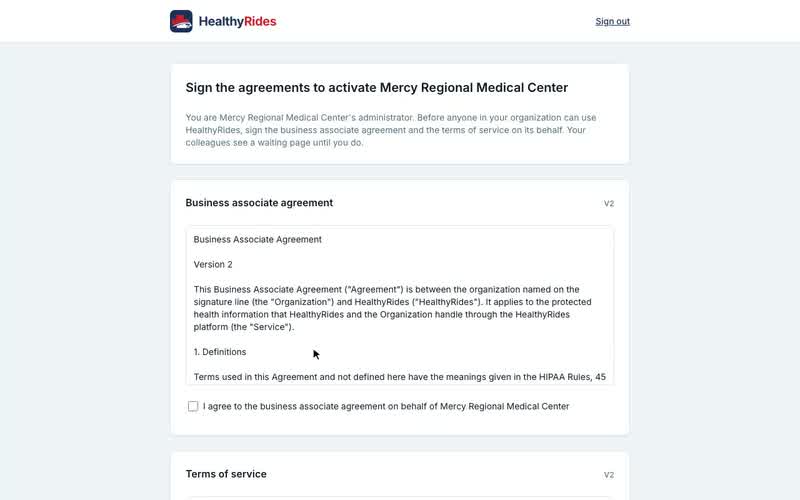
They see Sign the agreements to activate followed by the organization's name. To sign:
-
Read each document. Its version is shown beside its title.
-
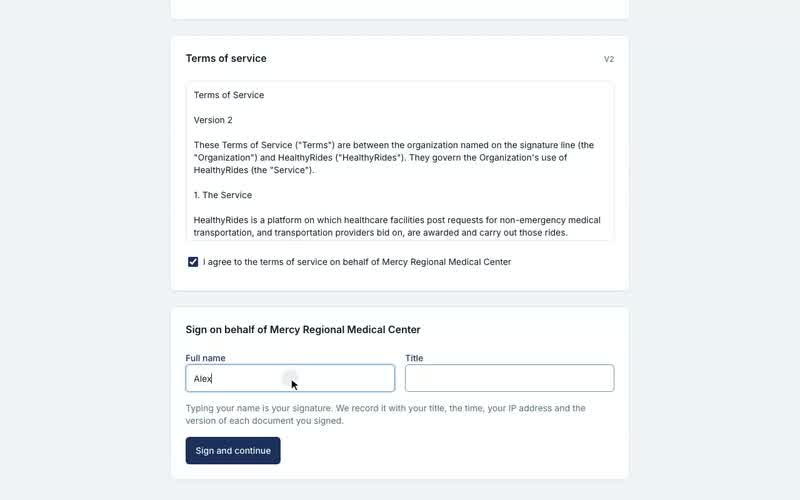
Tick I agree to the document on behalf of your organization for both.
-
Enter your Full name and Title.
-
Select Sign and continue.
The signature records the name and title, the time, and which version of each document was signed. That record is the signed agreement. HealthyRides does not countersign: it accepts by activating the organization.
HealthyRides then emails you a copy: the organization's name, the date you signed, and each document you signed with its title, version and full text, exactly as you read it. Keep that email as your copy. Signing again when nothing is left to sign sends no second email.
Everyone else waits
Until the agreements are signed, the organization is inactive. Everyone else who signs in sees Waiting for your administrator. There is nothing for them to do: Check again looks once more, and once the administrator has signed they go straight in.
When a document changes
A published document is never edited; a change is a new version. A signature on an older version does not count for a new one. So when a new version is published, the next administrator to sign in is asked to sign it, and until one does, everyone else sees the waiting page again.
Transcript
Loading the transcript…