Bidding on a ride
How to place a bid, what the form asks for, and what the facility sees.
A bid is your offer to carry a ride. You place it from the Available rides board. The facility reviews every bid and picks one, and it can pick any bid.
Transcript
Loading the transcript…
Walkthrough
-
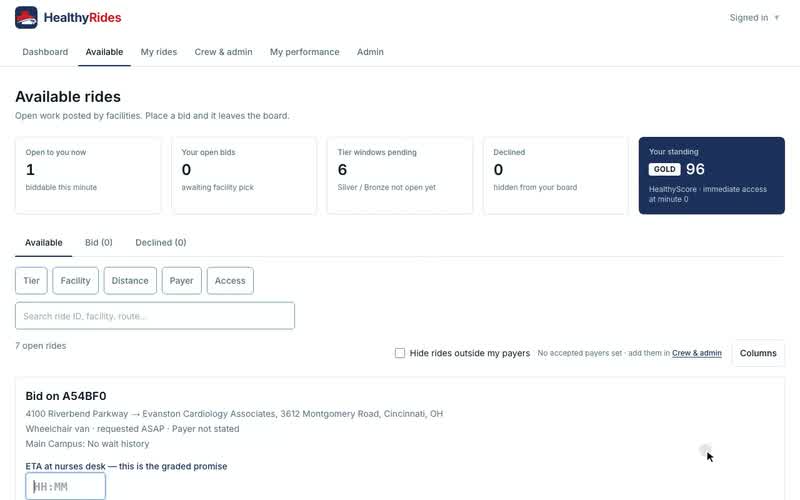
On Available rides, choose Bid on a ride. The form Bid on the ride's reference opens below the board.
-
Check the summary lines. They show the route, the tier (with Bariatric when needed), when it was requested and the payer.
-
Read the facility's average crew wait, shown on its own line, before you commit.
-
If the ride is marked Outside your hours, a note explains it. You can still bid.
-
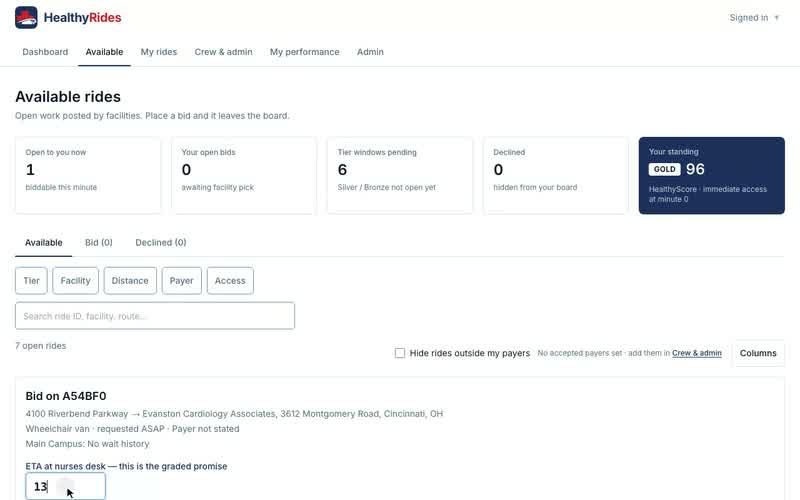
Enter your ETA at the nurses desk as HH:MM, on your provider's clock. It is required, and it is the arrival time you are graded against. For a round trip the form asks for an Outbound ETA and a Return ETA. A will-call return's ETA is optional.
-
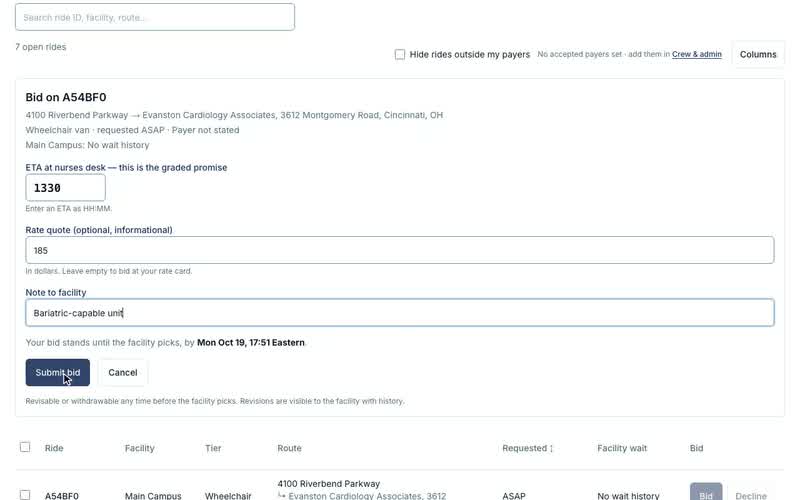
Optionally enter a Rate quote, in dollars, and a Note to facility of up to 1000 characters.
-
Read the line under the form, which says when your bid stands until. Choose Submit bid. The ride leaves the Available tab because it now carries your bid.
-
To back out, choose Cancel. Nothing is sent.
What the fields mean
- ETA at the nurses desk: when your crew will be at the nurses desk, as HH:MM in your provider's time zone. Required. The facility sees it with your bid, and you are graded against it. A round trip has one for each leg.
- Rate quote: an optional quote. It is information for the facility only. HealthyRides does not set, collect or settle a price.
- Note to facility: optional free text, up to 1000 characters, such as a bariatric-capable unit. The facility reads it with your bid.
- Payer: the payer class only (Medicare, Medicaid, Private, Facility-paid, Self-pay).
- Facility wait: how long crews have waited at this facility on average, so you can price in the delay.
After you bid
The facility sees your bid beside the others, with your provider name, quality, HealthyScore and rate quote. It ranks them by a blend of how close your time is to the request and your HealthyScore, and the facility can pick any bid regardless of rank.
A bid stays open until the ride's pick deadline. For a scheduled ride that is 2 hours before pickup unless the facility set its own. For an ASAP ride it is 30 minutes after posting. If nothing is picked by then, live bids lapse and the ride is re-broadcast to every Standing. The bid form names that moment before you submit, in your provider's time zone, such as "Your bid stands until the facility picks, by Fri Oct 16, 14:30 Eastern."
Your open bids are on the Bid tab of Available rides, between Available and Declined, and the Your open bids tile counts them. Each row shows the ETA you gave, with Outbound ETA and Return ETA for a round trip.
When the facility picks your bid, the ride moves to My rides. You are notified of the outcome either way.
Common questions
Can I change or withdraw a bid?
Yes, until the facility picks. On the Bid tab, choose Revise (the button carries your current ETA) to change the ETA, rate quote or note, then Save revision. Choose Withdraw and confirm with Withdraw bid to take the bid back. A withdrawn bid's ride returns to your Available tab.
If the facility has already picked the bid, or it has lapsed because the pick deadline passed, the screen says so and the bid cannot change.
Does the facility see my revisions?
Yes. Each revise appears as its own row in the Bid history on the facility's ride detail, such as "Tri-State Medic Transport revised bid: ETA 14:30 → 14:45", tagged Revised.
Is the ETA a promise?
Yes. It is the arrival time you are graded against if the facility picks your bid, so enter one your crew can meet. An ETA cannot be in the past.
Does a high rate hurt my chances?
The facility sees your rate quote but ranks mostly on timing and HealthyScore. It always chooses freely.